
Foreign Independent Travel
Booking Hotels:
Insert the hotel and select the correct line needed in tourplan, after that you have more option for the status:
-
Check if we have allocations available: go to Allocations on the left and then click on Available to see if we have allocation or not. If we do, you will be able to see them under the dates you need. Go back to Service List and change the status of the line to AL (Allocation) and then back to Allocation in order to click on the numbers of allocation available and then click on Allocate.

After allocating the allocation, you can send the confirmation to the hotel: select the line of the hotel and click on Send, the Message Selection will appear, to confirm the hotel the code to send is FICO.
Change the Output to Email, note that It will be Printer by default, click Send or Edit (if you need to add something in the reservation).

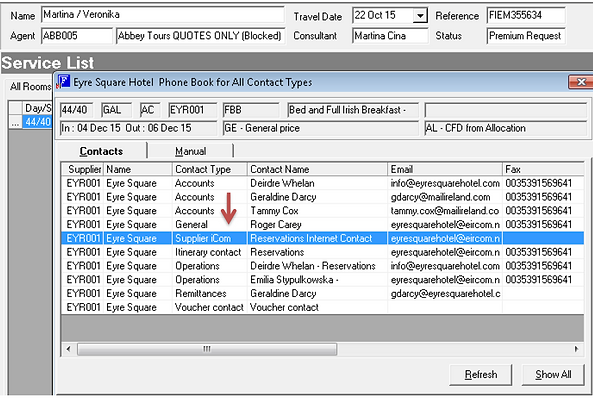
Select the correct email address for reservation, Supplier iCom. You will be asked to select the email address twice, always select the same. Accept and Send.
If we don’t have allocation available or not enough, you can leave the status in TB. Martina and her trainee will check availability with the hotel and get back to you.
When the status is OK it means that the hotel agreed to confirm the booking at contracted rates.
When the status is PA (part of allocation) it means that the hotel has been confirmed at contracted rates and we have partially used our allocation.
When the status is NA (non available) it means that the hotel is not available at contracted rates – you will receive a message queue:

Here there is the message In reference to the TB booking – you will receive it in any case if the hotel is confirmed or N/A.