
Accommodation
Manual for handing back a tour series to business development
Location of Tour Series Handover Template:
-
You need to locate the Handover Series Template for the specific Tour Series you were working on. For the purposes of this I will use Behringer - Nordirland.
The Handover Templates are located –
N: Drive/Accommodation Groups/Final Arrangements Sheets
From here you select the folder for the market that you are handing back. In this case it will be German. Then select the year – 2019 in this case.
In this folder you will see all the Tour Series been worked on along with the following folders
-
2019 Confirmed Series – this is where the Confirmed Series will then be saved
-
2019 Screenshots of Confirmed Series – This is where the copy of the Tour Series Report for the particular series you are handing back will be saved.
Below is a screenshot of inside the German 2019 Tour Series Folder:

You will need to locate the Tour Series you are handing back.
You need to rename it, change the WO (working on) to CO (confirmed).
You then need to move the series to 2019 Confirmed Series. This is where all Tour Series that are handed back as confirmed will be stored.
The reason you do this prior to entering any information on the document is any links you insert will work correctly.
Filling in the Handover Template:
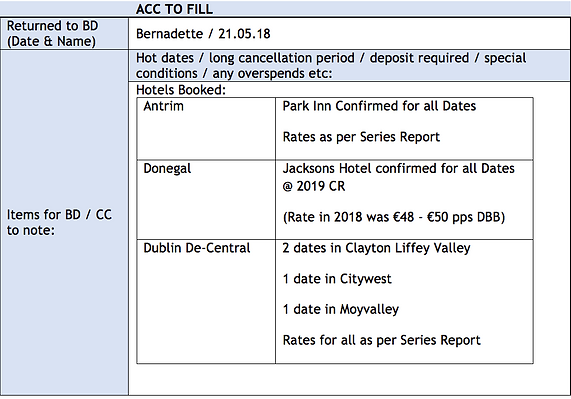
You can then open the handover template and at the end of the Handover Template is a box called ACC TO FILL.
Here is where we fill in the hotels that we have booked.
In box Returned to BD (Date & Names) – please type your name and the date you are handing it back.
In Box Hot dates / long cancellation period / deposit required / special conditions / any overspends etc: - List here the hotels that you have booked for the series.
Highlight the following:
-
Long Cancellation Periods, anything different to Abbey normal terms
-
Deposits required – if any
-
Event Dates
-
Any MN(missing nights)
-
Any WL (waitlists)
It should look like the below:
Saving a copy of the Series Report:
From here please save a copy of the Series Report for the series you are handing back.
Please ensure that the series report is up to date, report is refreshed. Where rates are loaded for the specific year, ensure that they have been update on the series. If rates have not been update leave them as €0.00 so as to highlight to Business Development that rate is not yet agreed for the year.
Series Report will look like:

This will be saved in:
2019 Screenshots of confirmed series
Please save it as the Master Reference with the Agent reference and our Series Name
See example:

Final Step on Handover template – link to Copy of Series Report
From here go back to you Handover template and insert a link to the series report for your particular series.
There are a few reasons why I do this –
-
Account Handler can see clearly what is booked and the rate, it also show the cost per tour
-
It will be highlighted in the relevant colour any MN and WL
-
They can be used as a reference to look back at what was confirmed prior to any amendments.
Once the link is entered on the Handover Series Document this is all the information you need to put. It should look like the below:

For this example we have no MN’s or WL’s to highlight or anything specific to this group.
If you had anything other than the normal terms and conditions it would be highlighted here.
Email to Business Development – Handover
Once this is done please send an email to the account handler advising that this is now been handed over and all groups are now set to CO.
Copy and Paste the Hotels Booked from the Handover Template and put into the email body and also insert a link to the Handover Template.
Email should be in the below format:

You have now successfully handed back a Complete Tour Series.